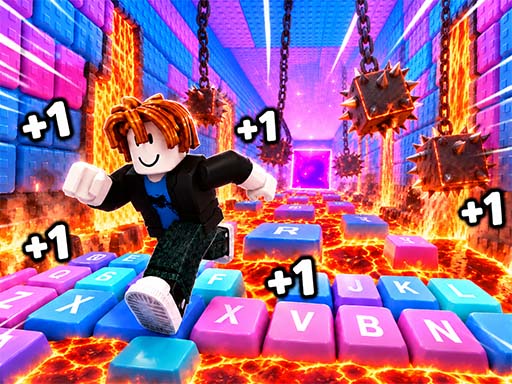
Speed ASMR Keyboard Escape is a fast-paced skill game where you run across a massive keyboard, collecting boosters and avoiding deadly obstacles. The game is thrilling and smooth, combining quick reflexes with fun mechanics like jumping over traps and unlocking new trails. With each step, your speed increases—making every run more intense and rewarding. It’s a unique blend of platforming and speed, offering players a lively, immersive experience that keeps you on your toes.
Why it’s fun? The game turns a familiar keyboard into a dynamic world. As you dodge rolling balls, lava, and crushing cubes, you feel the thrill of speed and survival. The ability to unlock skins, speed treadmills, and new paths adds personal progress and motivation. Plus, the simple, intuitive controls make it easy to jump in and play—even in short bursts.
How to play
- Desktop: Use W/↑ to move forward, S/↓ to move backward, A/← to move left, D/→ to move right. Press Spacebar to jump over gaps and traps. Click the mouse to open the shop, character menu, settings, or daily reward panel.
- Mobile: Drag the on-screen joystick to move in any direction. Tap the jump button to jump over gaps and traps.
Tips
- Jump early to avoid traps—timing matters, and a well-placed jump can save you from danger.
- Collect boosters along the way—they help you go faster and survive longer.
- Check your daily reward often; it’s a quick way to earn points and boost your progress.
FAQ
- Is it free? Yes, Speed ASMR Keyboard Escape is completely free to play.
- Can I play on mobile? Yes, it works on phones and tablets using touch controls.
- How do I win or score? Score points by surviving obstacles and collecting boosters. Earn win points to unlock new trails, skins, and speed treadmills.
Try Speed ASMR Keyboard Escape free on Asupergame—no download, no sign-up, just instant fun!